FuelPanel Call or WhatsApp+91 82178 15639

Petrol pump management software

Manage your petrol pump from the office. Stay in control from anywhere.

FuelPanel brings shift readings, cash reconciliation, credit customers and tank stock into one system. Manage operations through your office computer or web browser, and monitor your business from your phone.

  • Today's sales and cash, shift by shift
  • Which attendant is short, and by how much
  • Credit due from every customer
  • Tank stock against meter sales
See how FuelPanel works

Free demo on a video call. We set it up and train your staff.

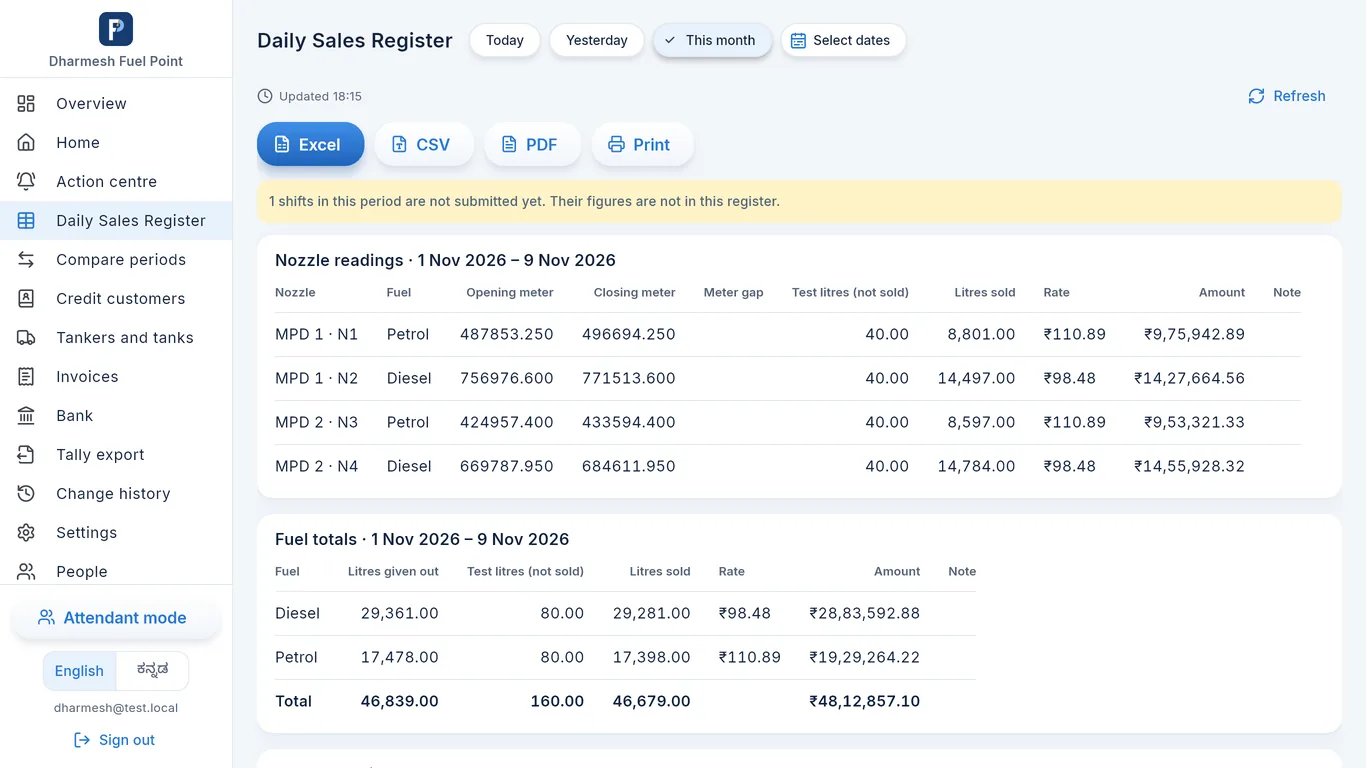
FuelPanel Windows software: Daily Sales Register with nozzle readings, litres sold and amounts, and Excel, CSV, PDF and Print buttons
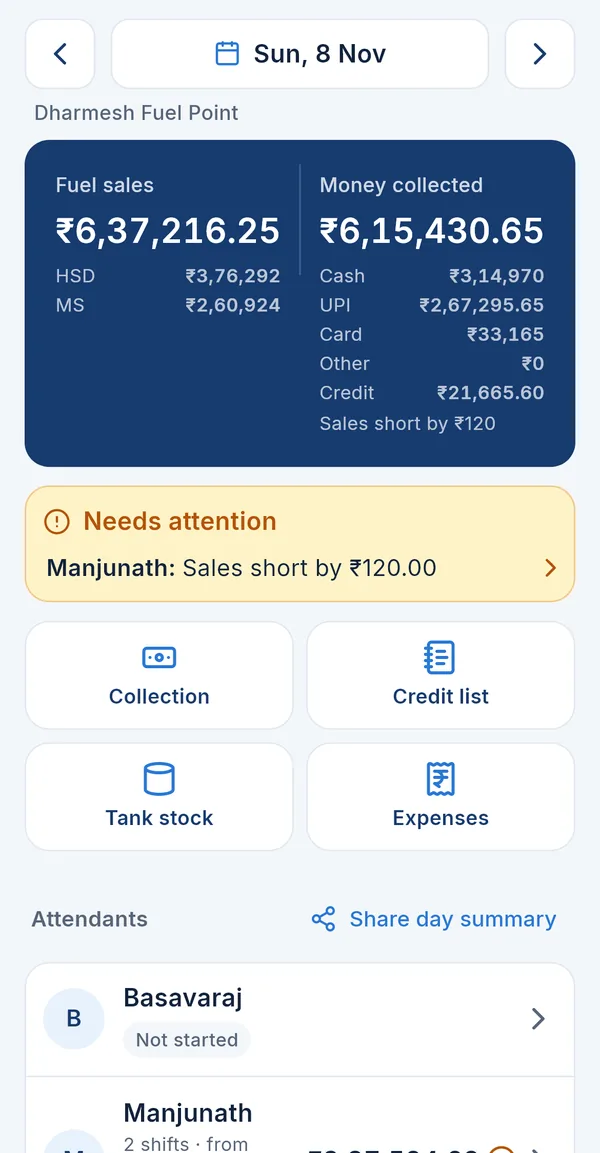
FuelPanel phone app: owner home screen with fuel sales ₹6,37,216, money collected, and a warning that one attendant is short by ₹120
Windows software and phone app, with a demo bunk's records

Built with 20 petrol bunkssmall and big, from their daily work

Set up on a video callno visit needed, any town

Free staff trainingowner, manager and attendants

Help on call and WhatsAppfor doubts and emergencies

One system. Three ways to access it.

FuelPanel is one petrol pump management system with three ways in. The Windows software, the web app and the Android app all work with the same records: an entry made on one is seen on the others.

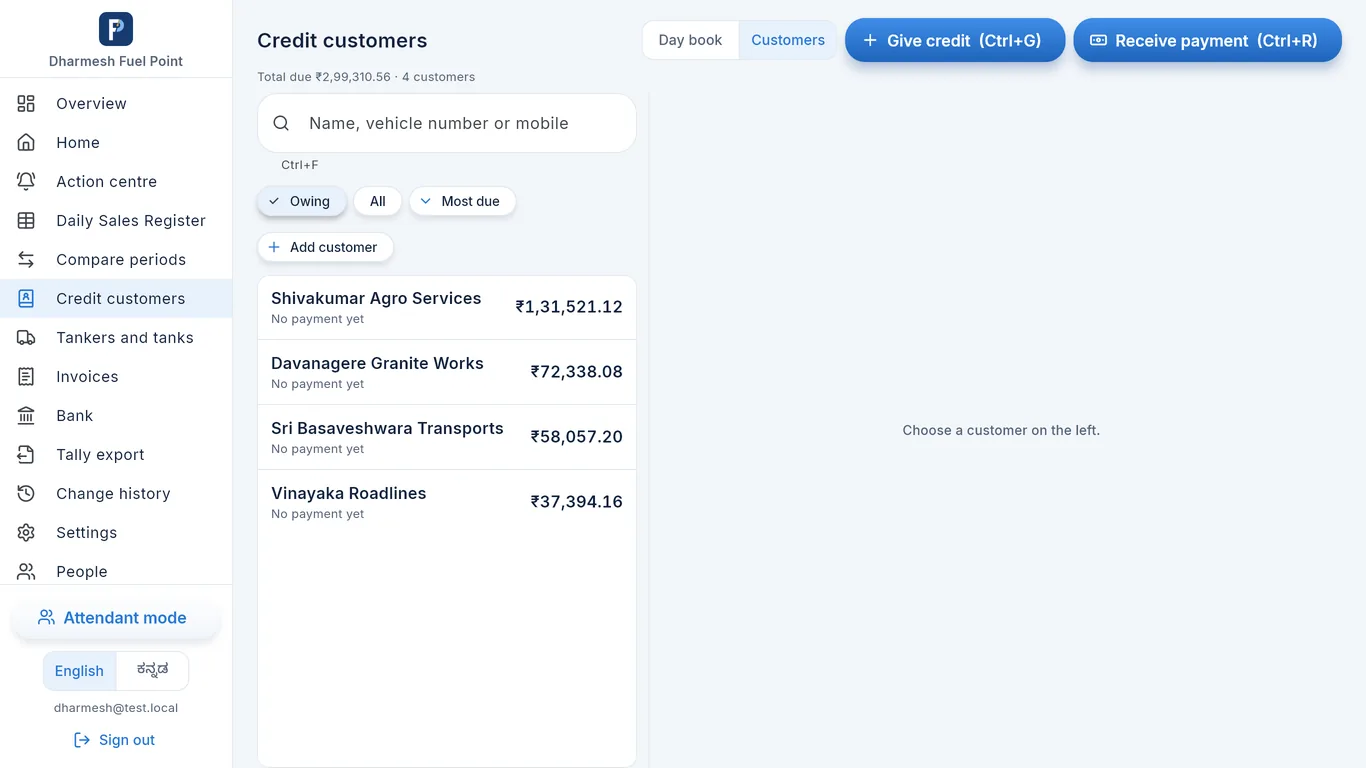
FuelPanel Windows software: credit customers with the amount each one owes and the Give credit and Receive payment buttons

Windows software

For the office computer

  • Daily Sales Register for any dates, compare periods
  • Excel, CSV and PDF, and printing
  • Credit customers, credit bills and GST fuel bills
  • Tankers and tanks, bank statement import
  • Export for Tally, change history
  • Attendant mode, to enter a shift at the counter
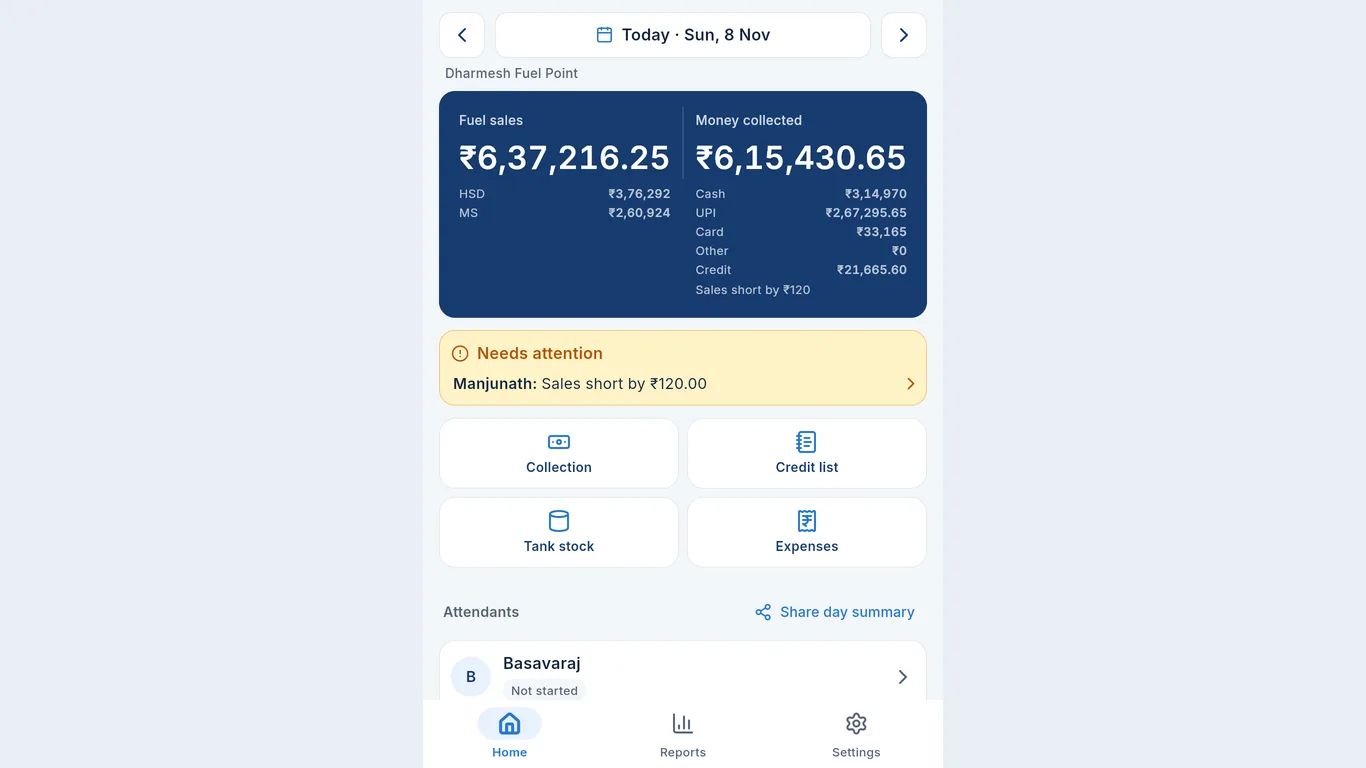
FuelPanel web app open in a browser on a computer, showing the owner home screen for 8 November

Web app

In a browser, on any computer or tablet

  • Nothing to install: open it and sign in
  • The same screens as the phone app
  • Check the day and enter records from any desk
FuelPanel Android app: owner home screen with the day's sales, money collected and a shortage warning

Android app

For the owner, managers and attendants

  • Shifts, cash, credit, dips and tankers entered at the pump
  • Attendants sign in with a PIN
  • The owner sees sales, cash, shortages, credit and stock
  • A message when a shift is closed or changed

What changes at your bunk with FuelPanel

Complete control over daily operations

Every shift, payment, credit, dip and tanker is in one system that you can open from the office or your phone.

If the manager leaves, the records go with him.Records are kept on FuelPanel's server, not in one notebook or one person's phone.

Fewer manual calculations and mistakes

Staff type the readings and count the notes. FuelPanel adds up the litres, sales, cash and balances.

Adding up the register takes an hour every night.The totals are worked out as the entries are typed, the same way every time.

Shift-wise accountability

Each shift belongs to one attendant, with their nozzles, readings and money.

Cash is short again. Which boy, how much?Every shift shows the shortage or excess of that attendant, the same day.
My attendants don't have smartphones.They don't need one. The manager or owner can enter the whole shift for them.

Sales, cash and stock that add up

Meter sales are checked against the money received, and tank stock against the dip.

Tank stock and meter sales don't match.Dip, fuel received and litres sold are in one place, so the difference is clear in litres.

Credit customers under control

A running balance for every customer, with each fill and payment by vehicle number.

The bus company says they already paid.Open the customer: every credit fill and every payment, with date and vehicle number.

Reports and a clear view of the business

Daily, monthly and attendant-wise reports, and a record of every change.

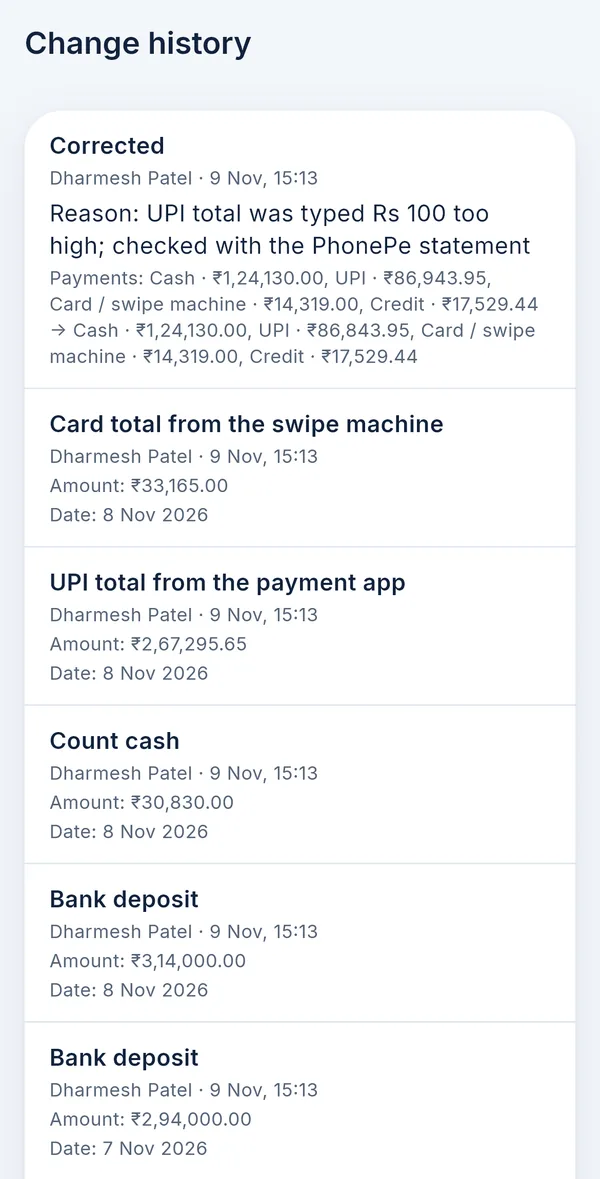
Someone changed the figures.Every change is kept in the change history: who changed what, when, and why.

See FuelPanel

The real Windows software, web app and Android app, shown here with a demo bunk's records.

Windows Web app Android

Daily Sales Register on the office computer

Every nozzle's opening and closing meter, test litres, litres sold, rate and amount, then fuel totals, for today, yesterday, this month or any dates.

  • Save as Excel, CSV or PDF, or print it
  • Shifts not submitted yet are pointed out, not silently left out
Windows software: Daily Sales Register with nozzle readings and fuel totals

Credit customers, with keyboard shortcuts

Who owes how much, the most due first. Search by name, vehicle number or mobile. Give credit and receive payments from the keyboard.

  • Day book of credit given and received
  • Statement and bill for each customer
Windows software: credit customers list with the amount due from each

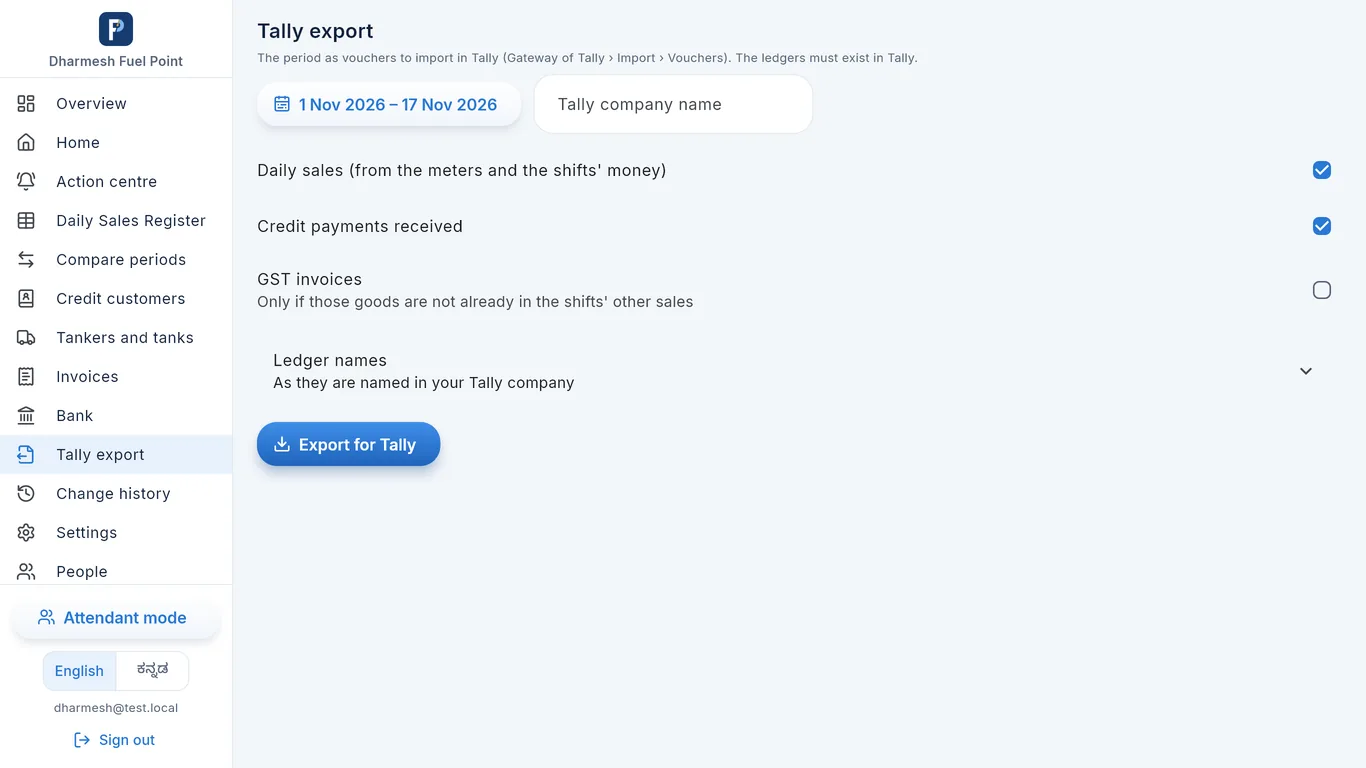
Export for Tally

Daily sales, credit payments received and GST invoices for any period, as vouchers your accountant imports in Tally, using your own ledger names.

Windows software: Tally export with period, ledger names and Export for Tally button

The web app in a browser

FuelPanel opens in Chrome or Edge on any computer or tablet, with nothing to install. It shows the phone app's screens, so a manager at the office desk sees and enters the same records.

  • Sign in the same way as on the phone
  • Good for a desk without the Windows software
FuelPanel web app in a browser, owner home screen for 8 November

The whole day on one screen

Fuel sales, cash, UPI, card and credit for the day. If an attendant's money doesn't match the sales, it shows at the top in yellow, with the name and the amount.

  • Go back to any earlier day with the arrows
  • Tap an attendant to open their shift
  • Collection, credit list, tank stock and expenses one tap away
Owner home screen with fuel sales, money collected, attendants and a shortage warning

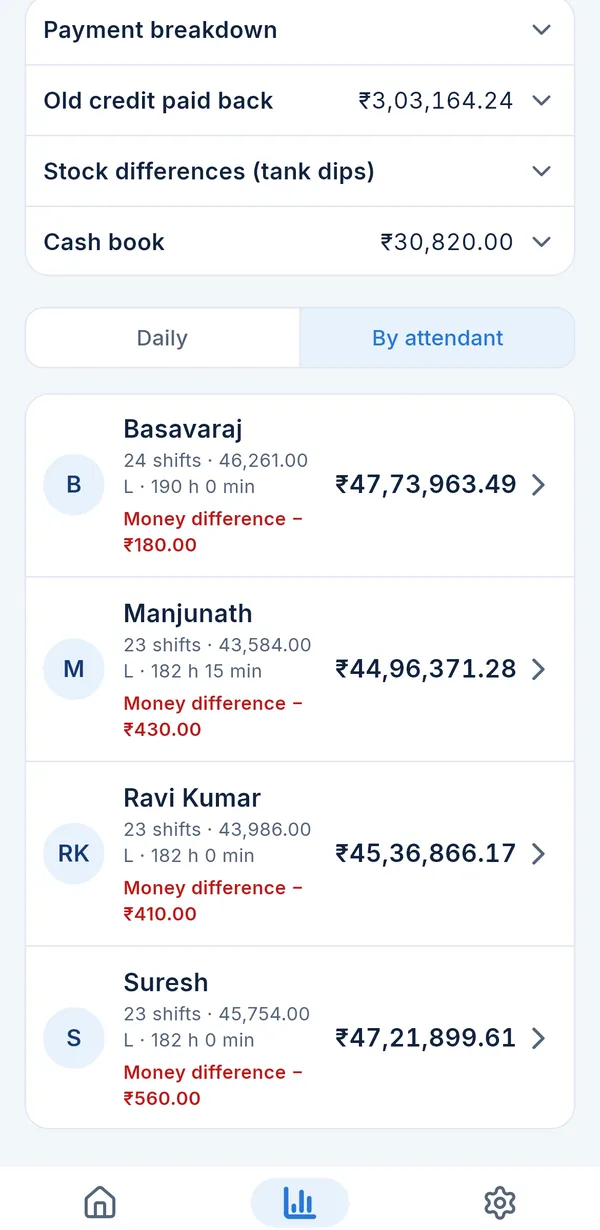
Attendant-wise report

For any day, week or month: each attendant's shifts, litres, sales and total money difference.

  • See who is short again and again
  • Share the report as PDF on WhatsApp
Monthly report by attendant showing shifts, litres, sales and money difference for each attendant

How it fits into your day

Your staff enter what they already write in the register. FuelPanel does the adding, checking and reports.

  1. Staff and managers record the dayShifts, cash, credit, dips and tankers, on the phone app, the web app or the Windows software's attendant mode.
  2. FuelPanel works it outSales, shortages, credit balances and stock, kept in order by day and by shift.
  3. The owner keeps watch from the phoneSales, cash and shortages from anywhere, with a message when a shift is closed or changed.
  4. The office does the paperworkReports, bills, Excel and Tally on the Windows software, or records in the browser.

Your staff enter

  • Opening and closing meter reading of each nozzle
  • Cash, note by note
  • UPI and card totals
  • Credit given, with the vehicle number
  • Credit payments received
  • Expenses paid from the shift cash
  • Tank dip and fuel received from the tanker

FuelPanel works out

  • Litres and sales of each nozzle
  • Sales of each shift and each day
  • Cash shortage or excess of each attendant
  • Attendant-wise report
  • Balance due from each credit customer
  • Tank stock and dip difference
  • Daily, monthly and date-wise reports

Meter readings are typed in by your staff. FuelPanel does not connect to the dispensers.

The daily work, step by step

How a shift is closed, how the cash is checked, how credit is kept and how stock is matched, on the real screens.

Shift closing

From the first reading to the owner's phone, for any number of dispensers and nozzles.

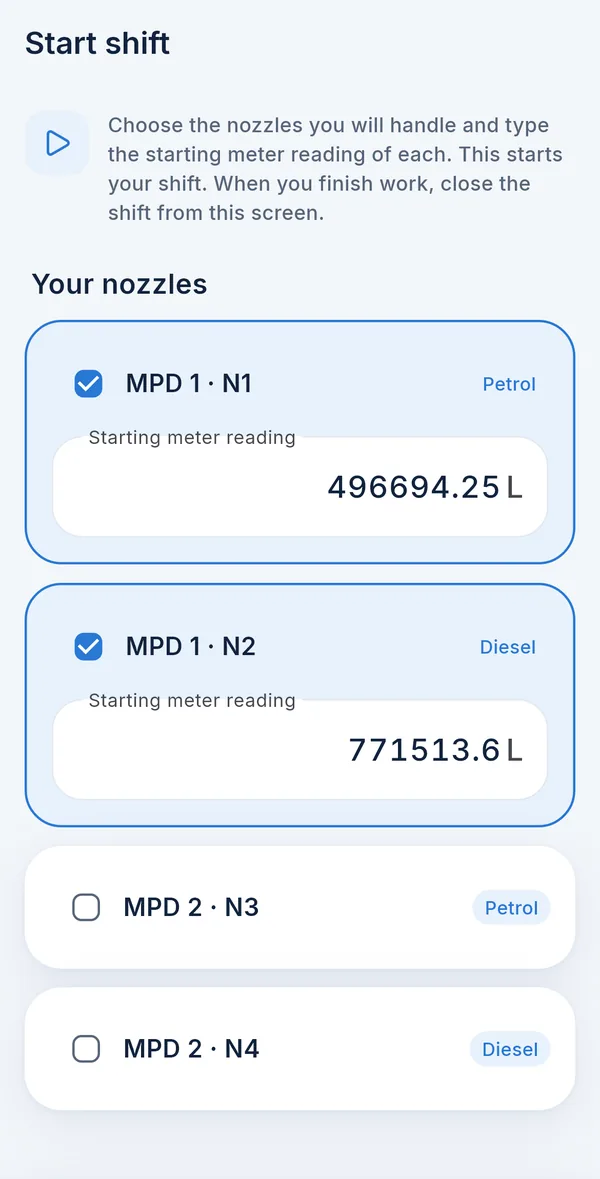
  1. Start the shift. The attendant signs in with a 4-digit PIN (or the manager starts it for him) and ticks his nozzles. The starting meter reading is filled in from the last shift's closing reading.
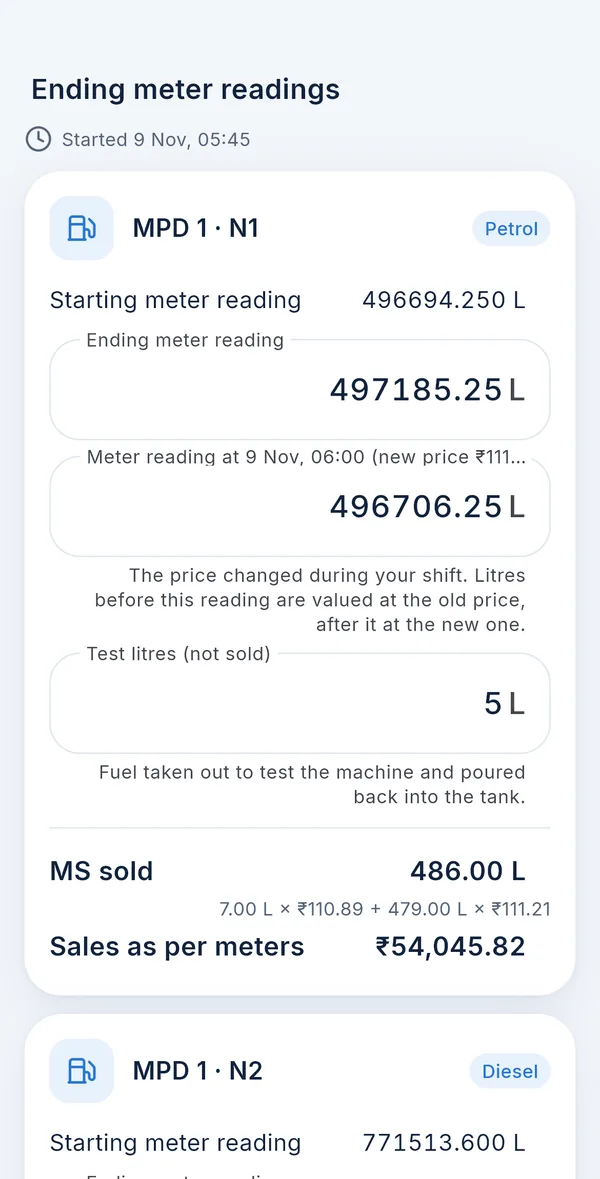
  2. Type the closing readings. At the end of the shift, the closing reading of each nozzle. Test litres (fuel poured back) are kept out of sales.
  3. FuelPanel works out the sales. Litres sold and sales at the day's price. If the price changes during the shift, both prices are used correctly.
  4. Submit. The owner gets a message on the phone, and the shift is in every report.
Start shift screen with nozzles MPD 1 N1 and N2 ticked and their starting meter readings
Finish shift screen with ending meter reading, test litres, litres sold and sales as per meters

Cash reconciliation

The money of each shift is checked against the meters, the same day.

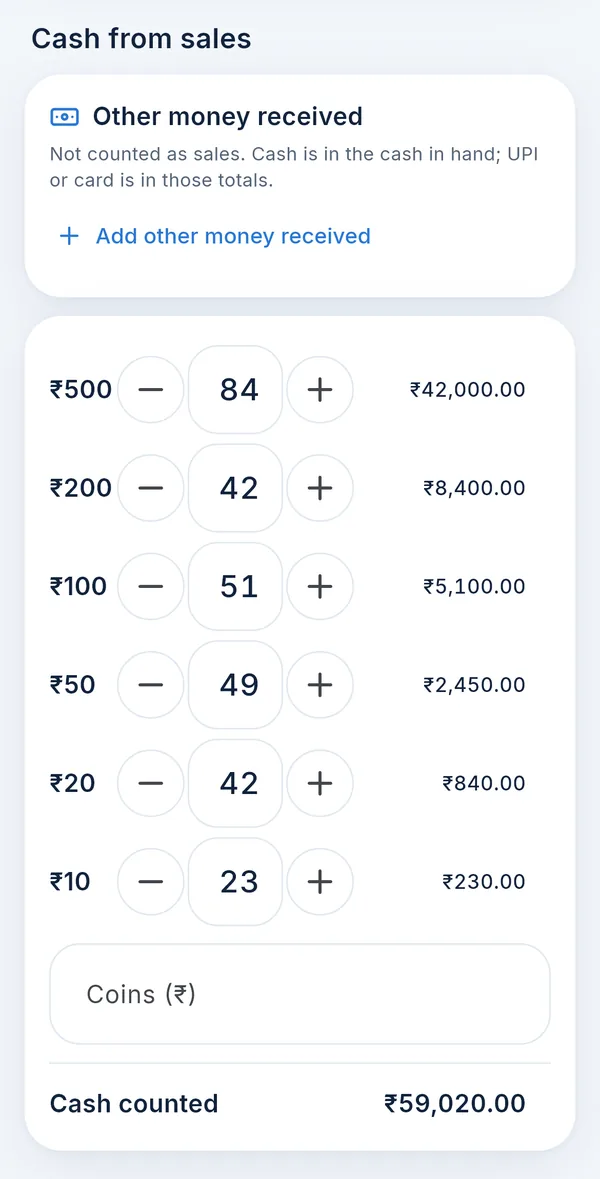
  1. Count the notes. ₹500 × 84, ₹200 × 42 … with plus and minus buttons; the total is added up for him. The owner or manager can type one total instead.
  2. Enter the other money. UPI, card, credit given and expenses paid from the shift cash.
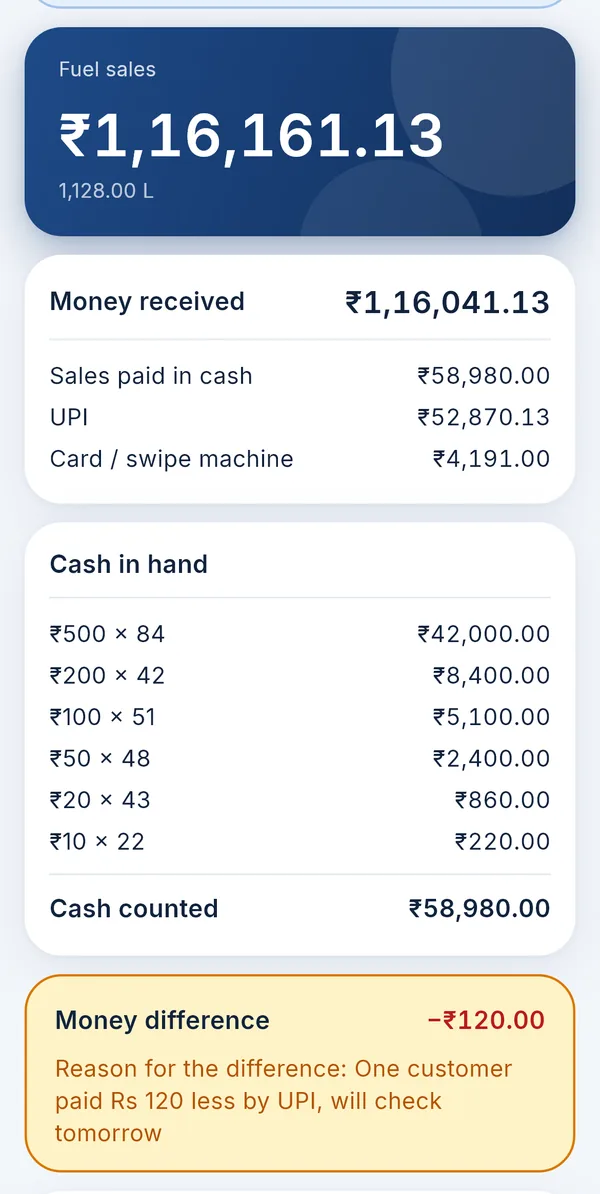
  3. See the difference. Sales as per the meters against the money received, short or excess in rupees, with the attendant's reason.
  4. Check the shift. The owner or manager marks it as checked. The attendant-wise report shows who is short again and again.
Cash from sales screen with ₹500, ₹200, ₹100, ₹50, ₹20 and ₹10 notes counted and the cash total
Shift page showing fuel sales ₹1,16,161, money received, cash in hand by notes, and a money difference of minus ₹120 with the reason

Credit transactions

Credit is kept as a running balance for each customer.

  1. Add the customer. With their vehicle numbers and, if you want, a credit limit. FuelPanel warns when a customer goes over it, and credit can be stopped for a customer or one vehicle.
  2. Give credit in the shift. Customer, vehicle number and amount. It counts in that attendant's shift money.
  3. Receive payments on any date. Cash, UPI or cheque, with a photo of the cheque. The balance changes at once.
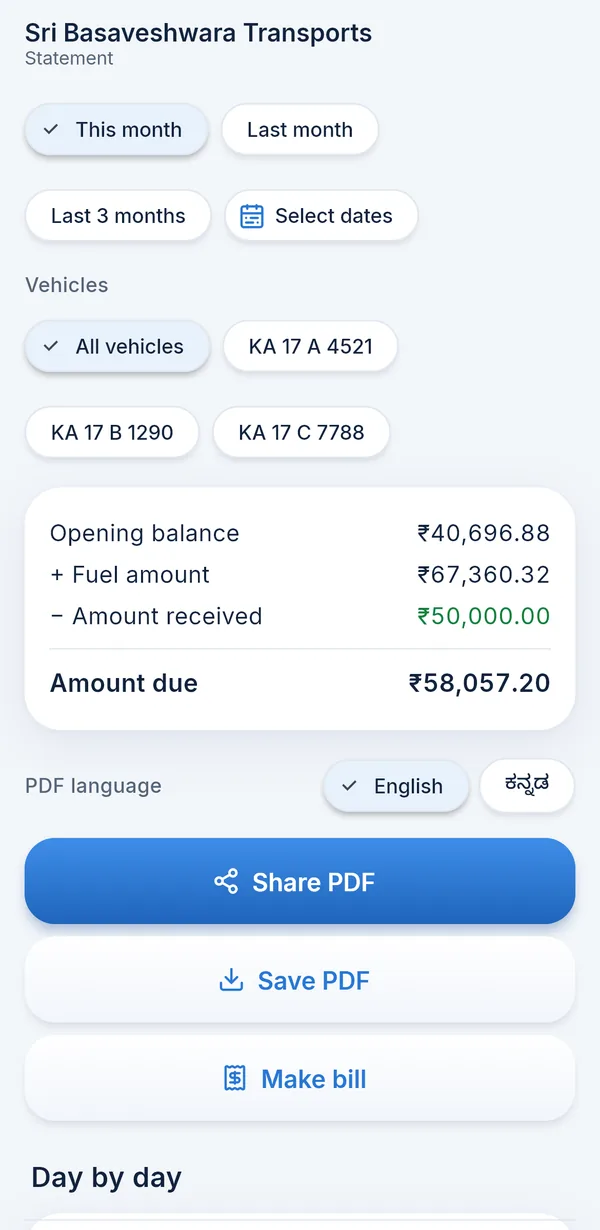
  4. Send the statement or a bill. For any dates or only some vehicles, with a discount per litre if you give one, as PDF.

On the Windows software: Give credit with Ctrl+G and Receive payment with Ctrl+R.

Credit customer statement with vehicle filters, opening balance, fuel amount, amount received and amount due

Stock reconciliation

Tank stock is checked against the meters and the tanker invoices.

  1. Set up the tanks. Each tank with its dip chart, and which tank each nozzle draws from.
  2. Record the tanker. Litres, rate per litre, invoice number and tank. Dips before and after unloading show the litres received against the invoice.
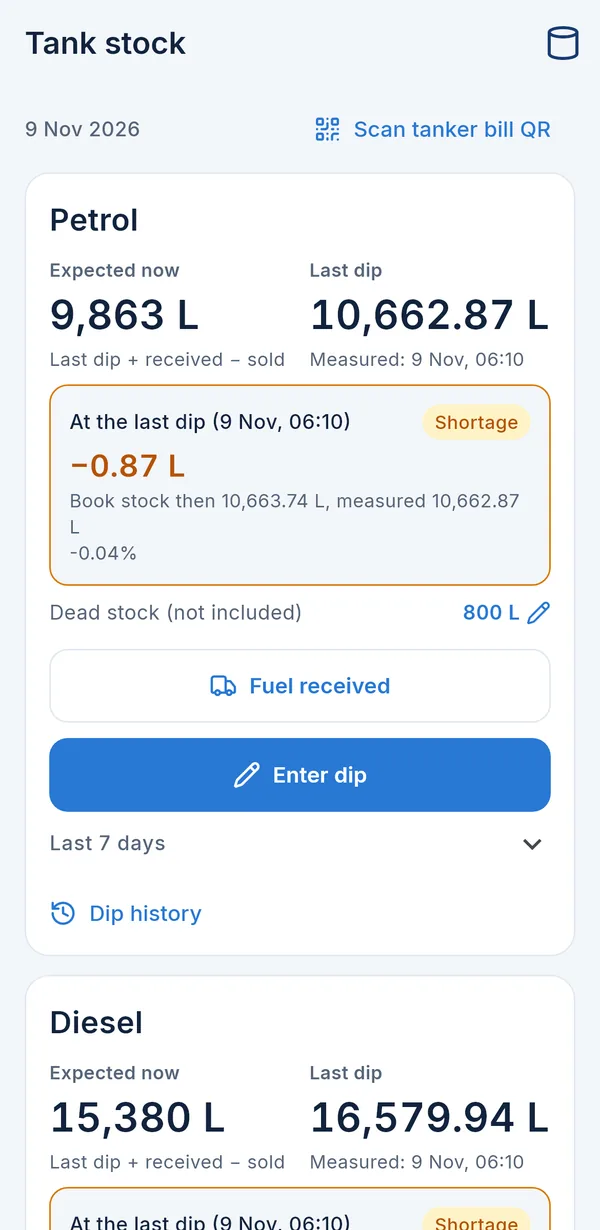
  3. Enter the dip. Expected stock = last dip + fuel received − litres sold. FuelPanel shows the shortage or excess in litres.
  4. Look back any time. Dip history for every tank, and stock differences in the monthly report.
Tank stock screen for petrol and diesel with expected stock, last dip and shortage in litres
Owner home screen on a phone
Attendant-wise report on a phone

You don't have to be at your petrol pump to know what's happening.

Open FuelPanel on your phone, from home, from another town, or from your other business.

  • How much fuel was sold today?Litres and rupees, for each fuel.
  • How much cash should there be?Cash, UPI and card collected, shift by shift.
  • Which shift is short?The attendant's name and the amount, in yellow.
  • How much credit is outstanding?Total due, and each customer's balance.
  • Is the tank stock right?Expected stock against the last dip.

When a shift is closed or changed, you get a message on your phone.

Complete petrol pump management

Everything your bunk keeps in registers, in one system.

Shift, sales and cash

  • Shift start and close, by the attendant or for him
  • Cash counted note by note; UPI, card and other payment modes
  • Shortage or excess of each shift, with the reason
  • Fuel price confirmed each day; a price change during a shift handled
  • Other sales in the shift (oil, water)
  • Cash taken from an attendant by the owner or manager

Meters and nozzles

  • Any number of dispensers and nozzles
  • Opening reading carried from the last closing
  • Test litres kept out of sales
  • An opening that differs from the last closing is flagged
  • Meter reset recorded with the reason

Credit customers and billing

  • Customers and vehicles, credit limit, stop credit
  • Credit given by vehicle number, in the shift
  • Payments by cash, UPI or cheque, on any date
  • Running balance and statement for any dates
  • Credit bills with discount per litre, as PDF
  • GST fuel bills (Windows)

Fuel stock, tankers and dips

  • Tanks with dip charts; nozzles linked to tanks
  • Dips and dip history
  • Tanker received with invoice, rate and tank
  • Tanker check: dips before and after against the invoice
  • Expected stock against the dip, in litres

Expenses and cash book

  • Expenses paid from the shift cash
  • Bunk expenses by category: electricity, salary, rent
  • Salary advances
  • Bank deposits and cash in hand
  • Bank statement import (Windows)

Employees and attendants

  • Attendants sign in with mobile number and PIN
  • Managers, and an accountant who can only read
  • Each person sees only their part
  • Attendance of each attendant
  • Shifts entered for attendants without a phone
  • Attendant mode on the office computer

Reports, exports and monitoring

  • Owner home: the day's sales, cash and shortages
  • Daily Sales Register, monthly, attendant, credit and stock reports
  • Compare periods; more than one bunk in one account
  • PDF reports; Excel, CSV and Tally on Windows
  • Change history: who changed what, when and why
  • A message when a shift is closed or changed

How you get started

No visit is needed. Everything is done with you on a video call, call and WhatsApp.

  1. Free demoOn a video call we show you FuelPanel with a demo bunk's records and answer your questions.
  2. PurchaseOne price to start, then a yearly AMC. See the price.
  3. Installation and setupThe phone app from a link, the Windows software from a setup file, the web app in the browser. We set up your nozzles, tanks, prices, payment modes, staff and credit customers with you.
  4. Staff trainingFree training for you, your manager and your attendants.
  5. Ongoing supportHelp with every doubt, and in any emergency, on call and WhatsApp.

Questions owners ask

What if the internet goes off?

FuelPanel needs internet to save entries to the server and to show reports. If the network drops while a shift is being closed, or while credit is given or a payment is received, the entry is kept on the phone and sent automatically when the network comes back and the app is open. It is never saved twice. Whatever is typed in a shift form stays on the phone even if the app is closed.

What if an attendant types a wrong reading?

The owner or manager corrects the shift and writes the reason. FuelPanel works the shift out again, keeps the old and new figures in the change history, and tells the attendant and the owner what was changed.

Can I see old records and reports any time?

Yes. Every day, shift, customer and tank stays in FuelPanel. Reports open for any day, week, month or dates you choose, and can be shared as PDF. The Windows software also exports Excel and CSV, and a file for Tally.

Will my attendants be able to learn it?

Attendants only enter what they already write in the register: readings, notes counted, UPI, card and credit. Buttons are big and the screens are simple. We train them on a video call. If an attendant does not use a phone, the manager or owner enters for him.

Is it in my language?

FuelPanel works in English and Kannada today. More Indian languages are being added. Each person can choose their own language.

Where are my records kept? Are they safe?

Records are kept on FuelPanel's cloud server and sent over an encrypted (HTTPS) connection. Owners and managers sign in with their Google account; attendants use a PIN. Each person sees only what their role allows, and only the people you add can see your bunk.

What happens if I don't renew the AMC?

FuelPanel does not stop working when the AMC ends. You can still sign in, enter shifts and open every report, and nothing is locked or deleted. Every bunk uses the same FuelPanel, so app updates are not held back. The AMC pays for our help: support on call and WhatsApp, emergency help, training for new staff and changes to your setup. That help is given while the AMC is active.

Do I need a computer?

Not to start: an Android phone is enough for the owner and staff. With an office computer, the Windows software adds the Daily Sales Register, bills, bank, Tally export, Excel and printing, and the web app opens FuelPanel in a browser. All of them show the same records.

Does it connect to the dispensers or tanks automatically?

No. Meter readings and dips are typed in by your staff, the same as in the register. FuelPanel then does all the working out.

What exactly do I get with FuelPanel?

One price at the start, then a yearly AMC. No limits and no extra charges for more staff.

To start

₹25,000

paid once, everything below included

After that, every year

₹5,000 annual maintenance (AMC)

Running more than one bunk? FuelPanel keeps them all in one account. Tell us how many on the demo call and we'll give you the price.

Included

  • FuelPanel software: phone app, Windows software and web app
  • Setup: your nozzles, tanks, fuel prices, payment modes, staff and credit customers, done with you on a video call
  • Set up for your bunk: standard setup and settings for the way your bunk works. Special changes or new workflows built only for your bunk are quoted separately
  • Training: for you, your manager and your attendants
  • Support: help with every doubt, and in any emergency, on call and WhatsApp
  • No limits: as many attendants, managers, nozzles, tanks and credit customers as you need

Built with petrol bunk owners

FuelPanel was designed by working with 20 petrol bunks, from small single-dispenser bunks to large ones, and it runs a bunk in Karnataka every day. Each screen follows the way bunks already keep their registers, so owners, managers and attendants recognise it.

Call or WhatsApp us on +91 82178 15639. You speak to the people who build FuelPanel.

Change history screen listing each correction with who made it, when and the reason
Every correction is kept: who, when and why

See FuelPanel working for your bunk

A free demo on a video call, about your own bunk.

Or call / WhatsApp +91 82178 15639

Book a Free Demo

We'll call you on this number to fix a time for the video call.

+91

Prefer WhatsApp? Message us